Sponsored by Bluehost. This article contains affiliate links. We may earn a commission if you sign up or make a qualifying purchase through our links, at no additional cost to you.
Introduction: Creating a Website Is Becoming Easier with AI
Have you ever wanted to create a website but felt that the technical work involved was too complicated? Whether you are a travel blogger, business owner, freelancer or content creator, getting a professional website online can involve several steps, from selecting a design and arranging pages to writing content and configuring hosting.
Artificial intelligence is changing this process. Instead of designing every section manually, you can describe the website you have in mind and let an AI-powered website builder help turn your idea into a working design.
One such solution is Bluehost AI Builder, which allows users to describe a website or web application in plain language, generate an initial design and make further changes through an AI chat interface.
We decided to explore this approach by creating a sample travel website for WeTravelFast. The idea was straightforward: build a website where travellers can discover destinations, read travel guides, explore useful travel tips and find information about international SIM cards.
In this walkthrough, we’ll show how we started with a simple description, created the website, explored its dashboard and reviewed the resulting homepage.
If you are considering creating your own website, this practical demonstration will help you understand how the process works.
[CTA: Try Bluehost AI Builder for Free – https://bluehost.sjv.io/Pz4Bnz]
What Is Bluehost AI Builder?
Bluehost AI Builder is an AI-powered website creation tool that helps users turn a written description into a website.
Instead of beginning with a blank page, you explain what you want to create. The AI uses your instructions to generate a website structure and design. You can then review the result and make further changes through the builder’s conversational interface.
For example, you could ask it to create:
- A travel blog featuring destination guides.
- A business website describing your services.
- A professional portfolio.
- A website for a personal project.
- A landing page for a new business idea.
The interesting part is that you can start with an ordinary sentence rather than needing to understand website development or write code.
Our Hands-On Experiment: Creating WeTravelFast with Bluehost AI Builder
To understand the process better, we decided to create a sample website called WeTravelFast.
Our objective was to build a travel-focused website with dedicated sections for destinations, travel guides, travel tips and international connectivity.
Here is how we approached the process.
Step 1: Open Bluehost AI Builder and Describe Your Idea
We started by visiting the Bluehost AI Builder page. The first screen presents different website examples and a prompt field where users can describe the website or application they want to create.
This is where the process begins. You do not have to select a complicated development environment or start arranging website elements manually. You simply explain your idea.
For our experiment, we wanted a modern travel website with a blue-and-white design, destination photography, clear navigation and dedicated pages for travel-related information.
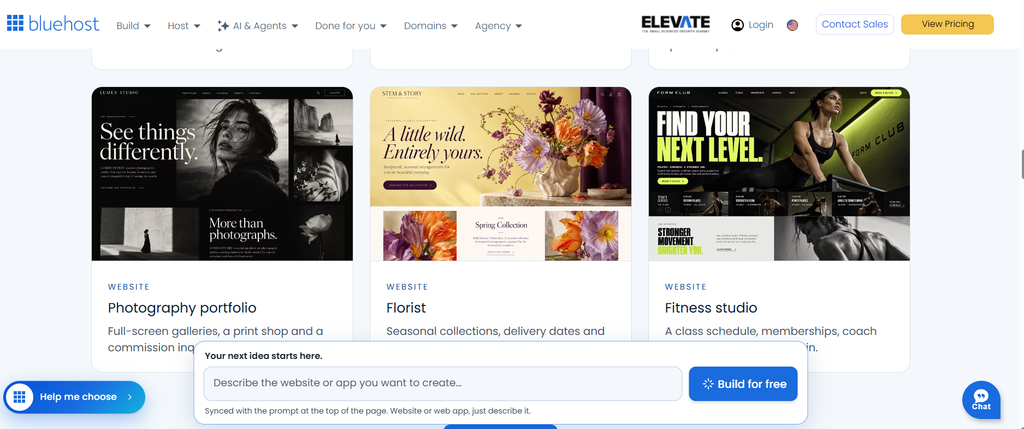
Image caption: The Bluehost AI Builder starting screen, where users can describe the website or application they want to create.
Step 2: Create an Account to Save Your Website
After starting the website creation process, Bluehost prompted us to sign up so that the website could be saved and accessed later.
The sign-up screen offered Google, Apple and GitHub sign-in options, along with email registration.
This is an important step because it allows you to save your generated website and return to the builder to manage it.
The campaign’s Free plan does not require a credit card to get started.
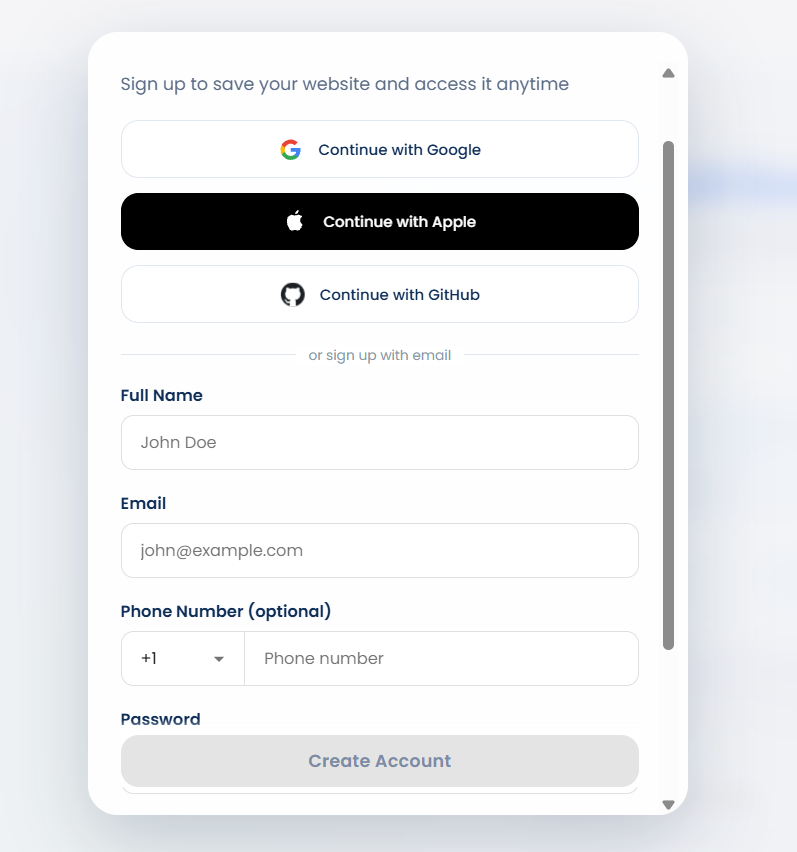
Image caption: Bluehost AI Builder account registration screen.
Step 3: Enter a Prompt and Let AI Generate the Website
Once we reached the builder, we entered a description of the website we wanted.
Here is the prompt we used:
Create a professional travel website called WeTravelFast. The website should help travellers discover international destinations, read travel guides, explore travel tips, and find international SIM cards and mobile connectivity solutions.
Include Home, Travel Guides, Destinations, Travel Tips, International SIM Cards, About Us and Contact Us pages.
Use a premium travel-inspired design with a blue and white colour scheme, beautiful destination photography, modern navigation, attractive destination cards and a responsive mobile layout.
The homepage headline should be “Explore the World with WeTravelFast”. Add sections for popular destinations, travel guides, travel tips and international connectivity. Include clear call-to-action buttons.
After submitting the prompt, the builder displayed a progress screen showing that it was reading our instructions and preparing the website.
This is one of the most interesting parts of the experience: the initial idea is communicated through a written description, and the AI starts turning that description into a website.
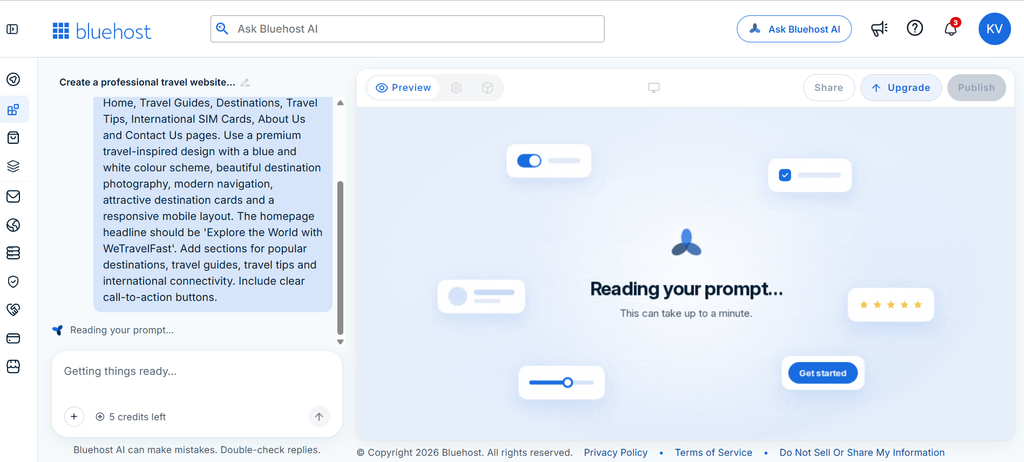
Image caption: Submitting our WeTravelFast website requirements to Bluehost AI Builder and allowing the AI to process the prompt.
Step 4: Review the Generated Website
After the generation process, the builder presented the completed WeTravelFast website.
According to the builder’s response, it had created a professional travel website with seven pages and a premium blue-and-white appearance.
The generated homepage included the WeTravelFast name, navigation links for Travel Guides, Destinations, Travel Tips, International SIM Cards, About Us and Contact Us, along with a prominent “Plan your trip” button.
The main banner featured the headline:
“Explore the World with WeTravelFast”
It also included two call-to-action buttons: “Explore destinations” and “Find a SIM card.”
This gave us an initial website structure without having to manually design the homepage from scratch.
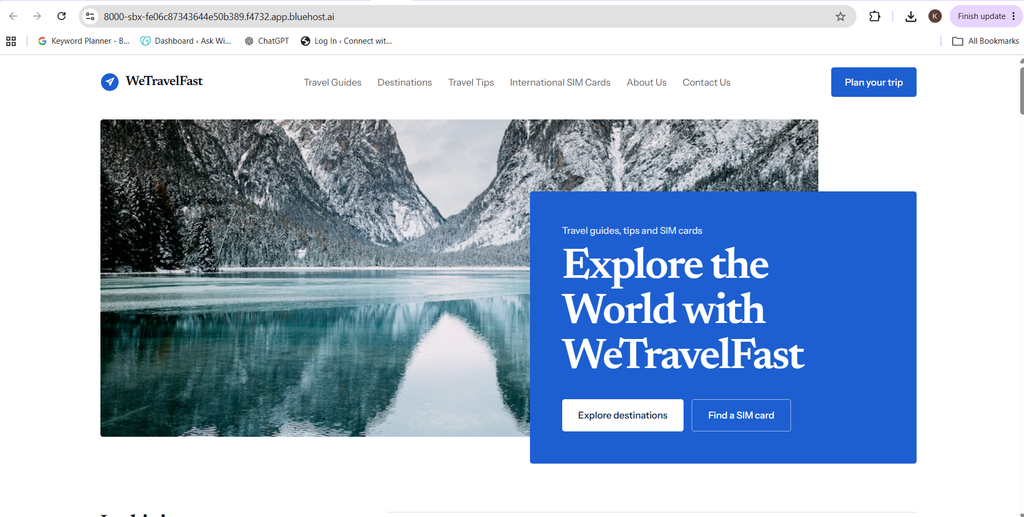
Image caption: Our WeTravelFast travel website homepage generated using Bluehost AI Builder.
Step 5: Explore the Builder Dashboard and Preview
After the website was generated, we explored the builder interface.
The dashboard provides a workspace for interacting with Bluehost AI and reviewing the website preview. The introductory tour also highlights different controls, including Preview, Settings, Manage your app, Share and Publish.
The Preview option lets you inspect the website as visitors would see it. You can also switch between desktop and mobile views.
This is useful because a website should be easy to navigate across different screen sizes, especially when visitors are accessing travel information using smartphones.
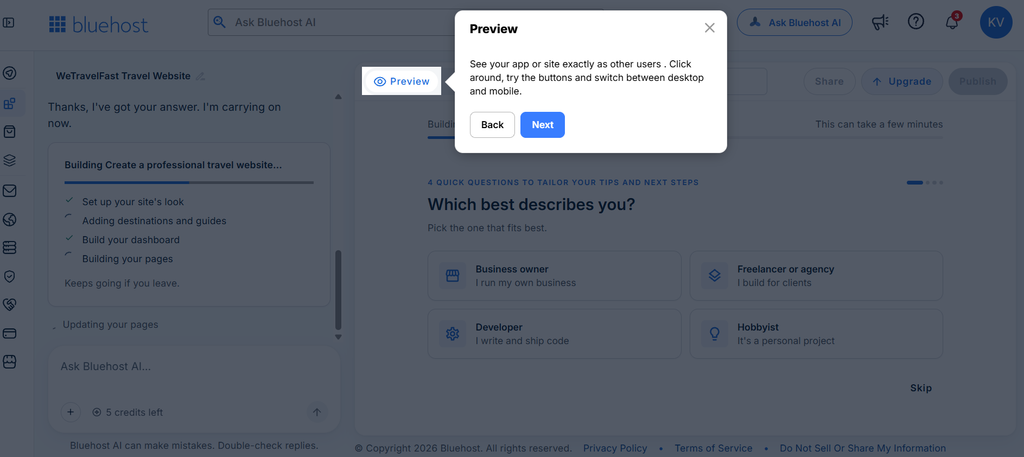
Image caption: Exploring the Bluehost AI Builder preview and the different options available for reviewing the generated website.
Step 6: Customize Your Website Through Settings and AI
Creating the initial website is only the starting point. You may want to change the design, update the website name, adjust its content or connect a domain.
The Settings section provides options such as renaming the app, connecting a custom domain, configuring email forms and adding API keys.
The dashboard also provides access to the app management area, where you can manage your website and replace sample content.
For our travel website, one important detail appeared in the builder’s response: the SIM-card plans and provider links were sample information and needed to be replaced in the dashboard.
This is worth remembering. AI-generated content provides a starting point, but you should always review prices, product information, provider details and links before making them available to visitors.
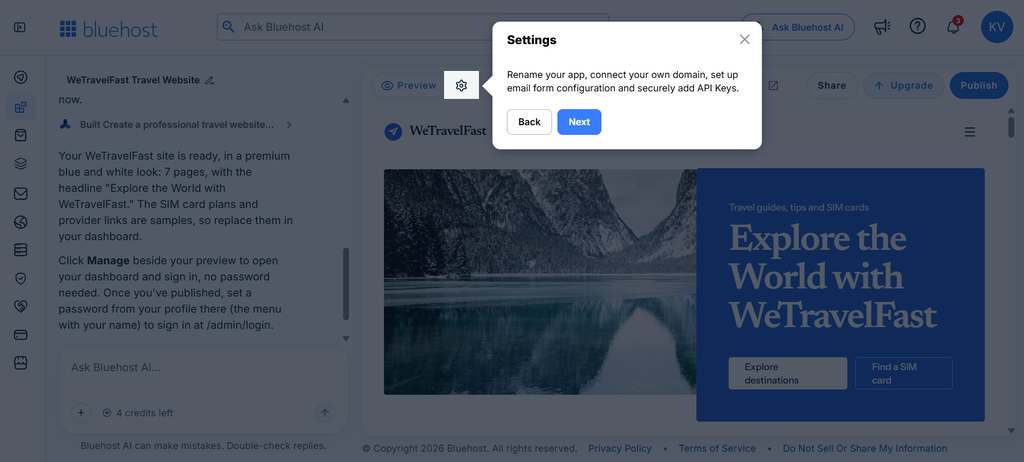
Image caption: The Bluehost AI Builder settings area, with options for website management and configuration.
Step 7: Share Your Website Preview for Feedback
Another option available in the builder is Share.
This allows you to share a preview link with others and collect feedback before making the website live.
For example, you could ask a colleague or team member to review the homepage, navigation, text and overall design.
Getting feedback before publishing can help identify areas that need improvement.
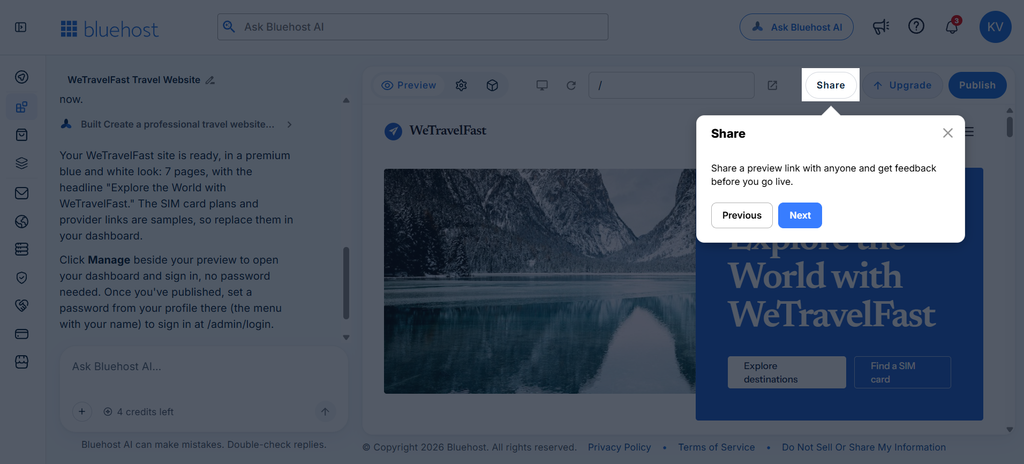
Image caption: Using the Share option to invite others to review the website before publishing.
Step 8: Publish Your Website
Once you are satisfied with the website, the next step is publishing.
The builder’s Publish option explains that publishing makes your application available at its own web address.
According to the Bluehost AI Builder campaign guidelines, the Free plan allows you to publish on a Bluehost subdomain without providing credit card details. If you want to connect your own domain, you need a paid plan.
Before publishing, review your pages, replace sample information, check all links and ensure that your content is accurate.
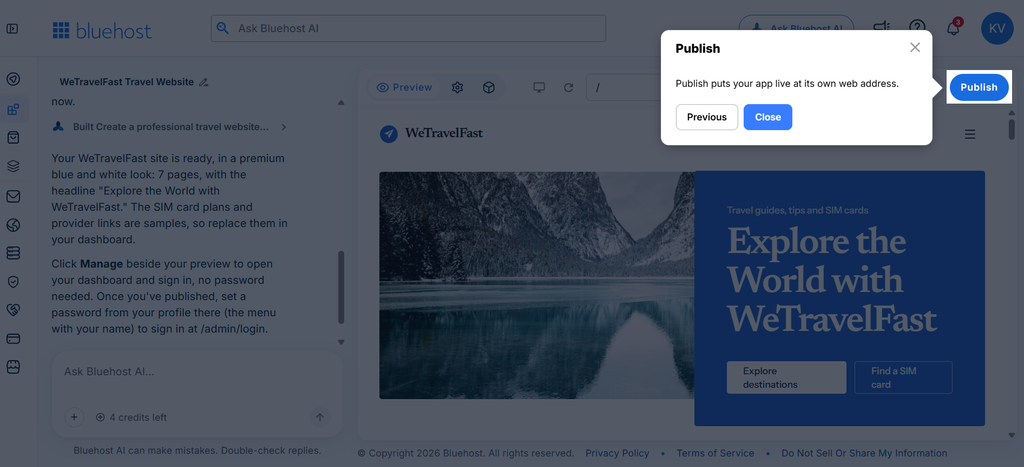
Image caption: The Publish option in Bluehost AI Builder, which makes the website available at its own web address.
Bluehost AI Builder Pricing and Plans
One of the useful aspects of Bluehost AI Builder is that users can begin with a free option.
According to the campaign information available to us, the plans are:
| Plan | Monthly price | Monthly credits |
|---|---|---|
| Free | $0 | 5 daily, up to 30 monthly |
| Lite | $20 | 100 |
| Standard | $40 | 200 |
| Pro | $80 | 400 |
Free Plan
The Free plan is a way to explore website creation without an upfront payment or credit card. It allows you to publish a website using a Bluehost subdomain.
Lite Plan
Starting at $20 per month, Lite provides 100 monthly credits and allows you to connect your own domain.
Standard Plan
Standard costs $40 per month and includes 200 monthly credits.
Pro Plan
Pro costs $80 per month and provides 400 monthly credits.
Hosting is included with every plan.
Understanding AI Credits
Bluehost AI Builder uses credits when you communicate with the AI to request changes. According to the campaign guidelines, one message uses one credit, while clarifying questions are free.
Unused monthly credits and purchased top-ups expire after 30 days. If you run out of credits, you may need to wait for your credits to refresh or purchase a top-up before making additional changes.
Your already published website remains online.
Key Features of Bluehost AI Builder
Here are some features worth exploring:
1. Prompt-based website creation: Describe your website idea in plain language and let AI generate an initial design.
2. Conversational editing: Request changes to website content, images, layout and design through chat.
3. Hosting included: Every plan includes hosting, so you do not need to purchase a separate hosting plan for the AI Builder website.
4. Responsive previews: Review the website across desktop, tablet and mobile views.
5. Website management: Use the dashboard to manage your application and update its content.
6. Human support: Bluehost provides 24/7 human assistance, according to the campaign guidelines.
Limitations to Consider Before Choosing Bluehost AI Builder
While the builder makes website creation more approachable, there are some limitations worth understanding.
- Free-plan subdomain: The Free plan uses a Bluehost subdomain. Connecting your own domain requires a paid plan.
- Credit limits: AI interactions use credits, so frequent editing may require a higher plan or additional credits.
- Ecommerce: AI Builder does not currently support ecommerce. Bluehost directs customers who want to sell products online to its separate AI Store product.
- Search rankings: Using an AI website builder does not guarantee Google rankings. Search visibility depends on content quality, competition and other factors.
- Sample content: AI-generated website content, prices and external links should be checked and replaced with accurate information before publishing.
Who Can Benefit from Bluehost AI Builder?
Bluehost AI Builder may be useful for people who want a straightforward way to get a website started.
Travel bloggers: Create a website for destination guides, travel stories and travel recommendations.
Small business owners: Introduce services, share company information and provide contact details.
Freelancers: Build a professional online portfolio to showcase skills and previous work.
Content creators: Create a central website for articles, projects and audience engagement.
Startups: Develop an initial website or landing page to introduce a business idea.
The right choice depends on your website requirements, expected editing frequency and whether you need features such as ecommerce.
Our Verdict: Is Bluehost AI Builder Worth Trying?
Our experiment shows how a simple written description can be used to generate the initial structure of a travel website.
We started with an idea for WeTravelFast, described the pages and design we wanted, and received a website with a travel-focused homepage and seven pages, according to the builder.
The ability to review a preview, access settings, manage the app and share the design for feedback makes the workflow interesting for people who want to explore AI-assisted website creation.
However, generated content still needs human review. In our case, the builder specifically identified the SIM-card plans and provider links as sample content that needed replacing.
The Free plan is a practical starting point for anyone who wants to try the process before choosing a paid plan.
If you are planning to create a travel blog, portfolio, business website or landing page, you can explore the builder and see whether it fits your requirements.
Ready to turn your idea into a website?
Start with a simple description and explore what Bluehost AI Builder can create.
[TRY BLUEHOST AI BUILDER FOR FREE – INSERT YOUR IMPACT TRACKING LINK]
Frequently Asked Questions
1. Can I use Bluehost AI Builder for free?
Yes. The Free plan costs $0, does not require a credit card and allows you to publish on a Bluehost subdomain.
2. Do I need coding skills to create a website?
The builder is designed around plain-language prompts and conversational editing, making it accessible to users who do not have traditional coding experience.
3. Does Bluehost AI Builder include hosting?
Yes. Hosting is included in every AI Builder plan.
4. Can I connect my own domain?
Yes. Connecting your own domain requires a paid AI Builder plan.
5. What happens when I run out of credits?
You need to wait for your credits to refresh or purchase a top-up before making further AI changes. Your already published website remains online.
6. Can I create an online store?
AI Builder does not currently support ecommerce. Bluehost has a separate AI Store product for online selling.
7. Can I edit my website after generating it?
Yes. You can use the builder’s chat and management options to refine your website and update its content.
Final reminder: Prices, plan features and availability may change. Check the official Bluehost AI Builder page for the latest information before selecting a plan.
About the Author